
When submitting a bug report, please use the below template and thoroughly fill out the necessary information.
Date & Time: 2026-05-19 19:56 UTC
Frequency: Always
World name: Malboro
Character name: Noelle Short
Retainer name: N/A
NPC name: N/A
Monster name: N/A
Class/Level: Lv100 SCH
Party or solo: Solo
In-game time: 22:33
Area and coordinates: N/A
Housing: N/A
Steps:
1. Open the System -> Character Configuration window.
2. Select "Hotbar Settings" on the left side.
3. Select the "Custom" tab at the top.
4. Check "Enable WXHB with simultaneous L2 and R2 double tap."
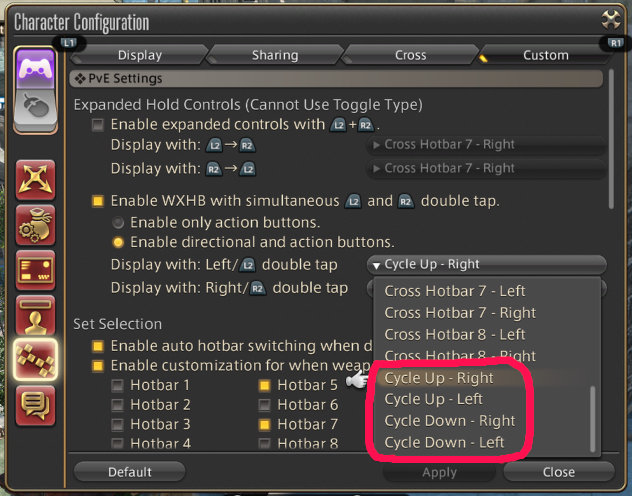
5. In the "Display with: Left/L2 double tap" drop down menu, at the very bottom, there are four options: "Cycle Up - Right", "Cycle Up - Left", "Cycle Down - Right", and "Cycle Down - Left".
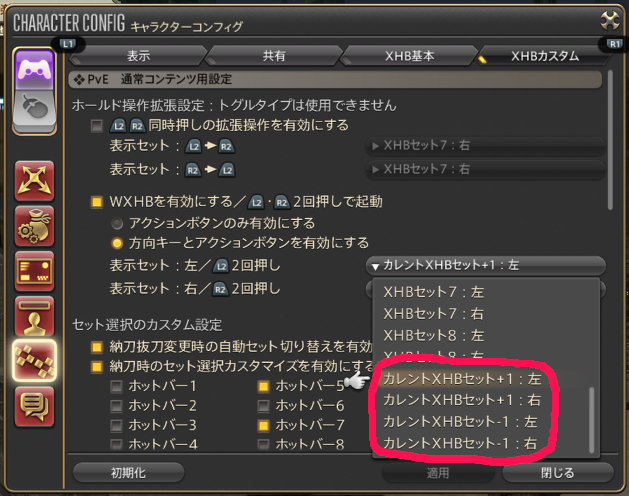
The "Right" and "Left" labels are reversed; "Cycle Up - Right" actually displays the left side of the next hotbar, and vice versa. Comparing this to the Japanese version confirms that this is a text issue with the English version specifically.
Continue reading...
Date & Time: 2026-05-19 19:56 UTC
Frequency: Always
World name: Malboro
Character name: Noelle Short
Retainer name: N/A
NPC name: N/A
Monster name: N/A
Class/Level: Lv100 SCH
Party or solo: Solo
In-game time: 22:33
Area and coordinates: N/A
Housing: N/A
Steps:
1. Open the System -> Character Configuration window.
2. Select "Hotbar Settings" on the left side.
3. Select the "Custom" tab at the top.
4. Check "Enable WXHB with simultaneous L2 and R2 double tap."
5. In the "Display with: Left/L2 double tap" drop down menu, at the very bottom, there are four options: "Cycle Up - Right", "Cycle Up - Left", "Cycle Down - Right", and "Cycle Down - Left".
The "Right" and "Left" labels are reversed; "Cycle Up - Right" actually displays the left side of the next hotbar, and vice versa. Comparing this to the Japanese version confirms that this is a text issue with the English version specifically.
Continue reading...