
Summary:
Be helpful in your Crystalline Conflict matches, whether you're in Ranked or Casual.
Marking a kill target helps your team focus their efforts. This macro combines both the "put the target marker 1 above enemy player's head" and "announce in quick chat that you're attacking target" features.
1. Create the Attacking Target macro
There are many variations on this, but this is the one I use and it's reliable for me because it allows you to activate it multiple times in succession on the same target without toggling the mark off and on each time.
The reason the attack2 line is there is because it clears the prior mark. Otherwise, pressing the macro several times in a row would turn the attack1 mark on and off.
Code:
2. How to target the player with the 1 mark
- Character Minimenu
- Actions & Traits
- General section
- Attack Target icon
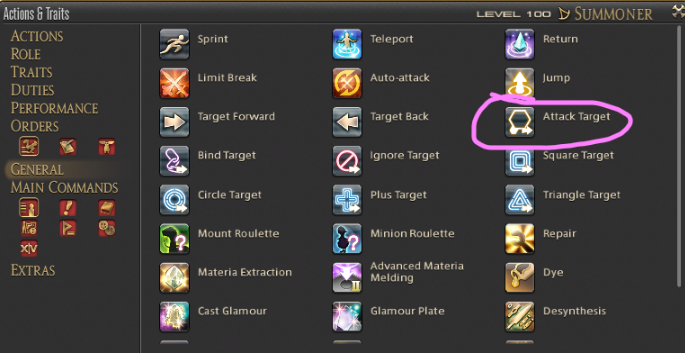
Drag this onto your hotbar and assign it to a keybind.
Now when you see the Quick Chat announcing "Attacking [job!]" you can quickly press your Attack Target keybind and target that person and help KO them.
Continue reading...
Be helpful in your Crystalline Conflict matches, whether you're in Ranked or Casual.
Marking a kill target helps your team focus their efforts. This macro combines both the "put the target marker 1 above enemy player's head" and "announce in quick chat that you're attacking target" features.
1. Create the Attacking Target macro
There are many variations on this, but this is the one I use and it's reliable for me because it allows you to activate it multiple times in succession on the same target without toggling the mark off and on each time.
The reason the attack2 line is there is because it clears the prior mark. Otherwise, pressing the macro several times in a row would turn the attack1 mark on and off.
Code:
Code:
/merror off
/micon "attack1" enemysign
/mk attack2 <t>
/mk attack1 <attack2>
/quickchat "Attacking Target" <t>
2. How to target the player with the 1 mark
- Character Minimenu
- Actions & Traits
- General section
- Attack Target icon
Drag this onto your hotbar and assign it to a keybind.
Now when you see the Quick Chat announcing "Attacking [job!]" you can quickly press your Attack Target keybind and target that person and help KO them.
Continue reading...